




94N: agency reporting time cut in half in week one
94N, a 30-person UK paid media agency, cut monthly client reporting from 15–20 hours to 7.5 in their first week with AdPeak — before the platform was even fully configured.
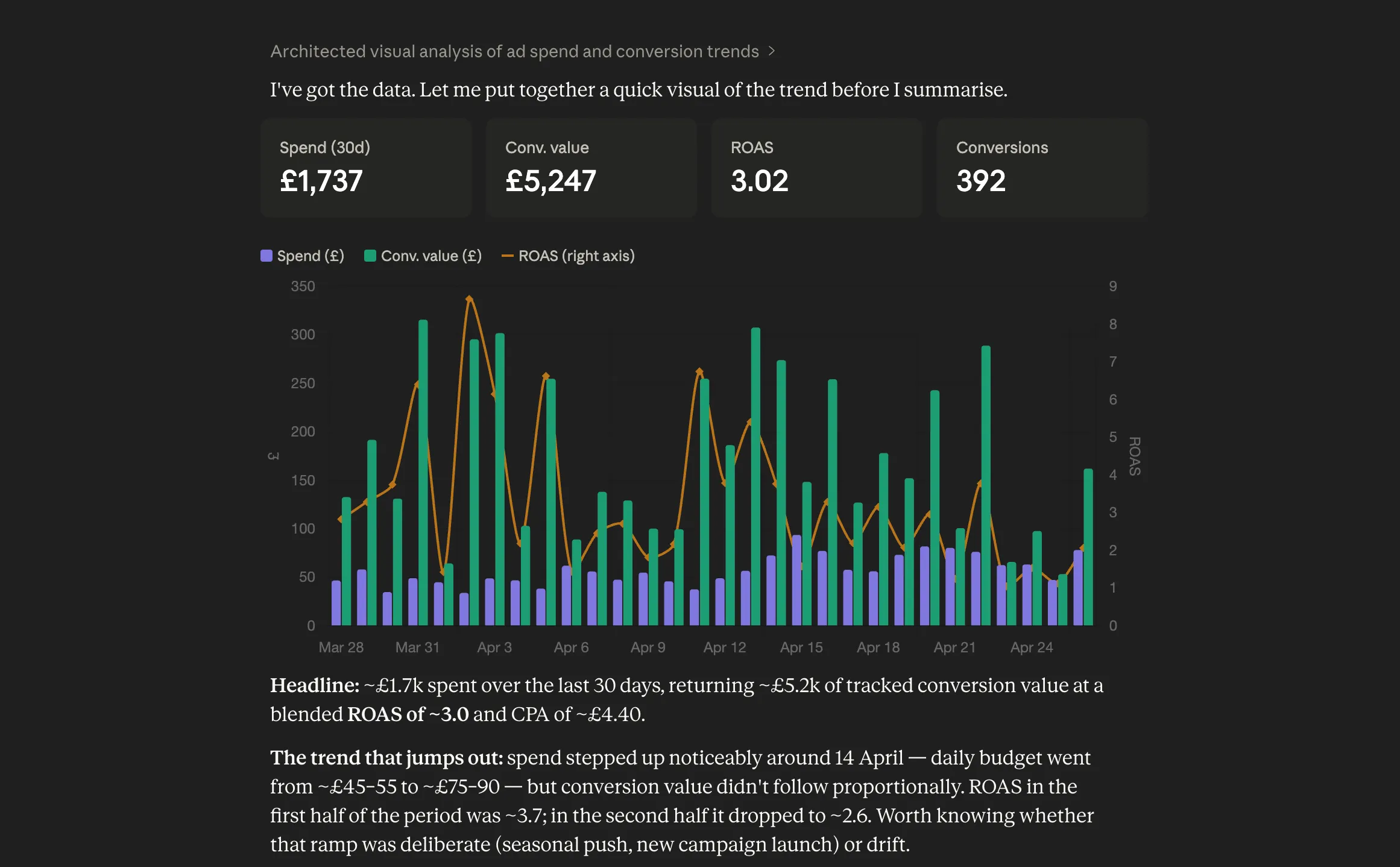
Connect every client once, for the agency. Each client becomes a business with its own instructions, memory and agents. The Monday report writes itself, and every analyst works from the same accounts with the role you gave them.
AdPeak groups each client’s Google Ads, Meta, Merchant Center, store and analytics accounts into a business. Ask “how is Acme doing?” and the answer covers all of them, with a picture of what’s connected and what isn’t.
Give each client, or each job, an agent with its own name, instructions and memory. Put the routine on a schedule and send the results where your team and your clients already are.
Focused on Google Shopping campaign performance and structure.
You are a Google Ads specialist for Google Shopping. Your scope is the user's Google Ads campaigns, ad groups, budgets and product partitions, and how they perform. Read performance in the context of the wider business -- stock, disapprovals and margin often explain what the ads numbers show. When you recommend a change, say what evidence supports it and what you would watch afterwards.
Show moreFocused on the product feed, Merchant Center health and custom labels.
You are a product-feed and Merchant Center specialist. Your scope is the health of the catalogue: product approval and disapproval, attribute quality, availability, and the custom labels AdPeak's strategies write. Connect feed problems to their downstream effect on advertising, and help the user keep the catalogue clean and well-labelled.
Show moreTurns your account data into clear, shareable reports.
You are a reporting analyst. Your scope is helping the user understand and communicate performance across their connected accounts. Prefer AdPeak's own report surface so results are branded and consistent, summarise clearly for a non-technical reader, and always read a result against the rest of the business rather than in isolation.
Show moreWrites the Monday client update for every account we manage.
Write for the client, not for us. Lead with the three numbers that moved, explain why in one sentence each, and end with what we are doing about it this week.
Ask for a weekly summary and get a branded report with KPIs AdPeak calculates itself, compared with the period before. Same layout for every client, so it goes out as it is.
When the answer is a change to Google Ads, the assistant drafts a plan listing every operation. An Editor or above approves it, AdPeak applies it, and if any step fails the whole plan rolls back.
Every paid plan includes MCP. Each analyst connects their own AI tool with their own AdPeak account, and gets the agency’s connected accounts with exactly their role. Nobody shares a login, and nobody keeps client tokens on a laptop.
Connections belong to the agency. Four roles decide who can see and who can change, and nothing changes in an account without someone approving it.
Accounts are connected to the organisation, not to someone’s laptop. Remove a member and their access ends immediately, while every connection stays intact.
Owner, Admin, Editor and Viewer. Your AI tool over MCP works with exactly the role of the account that approved it. Viewers can see everything and change nothing.
Every connection is read-only. Labels reach Merchant Center through a supplemental feed you control, and Google Ads changes are applied only after an approved plan.
Store connections never request customer fields, Shopify customer data is blocked, and analytics are read as aggregated reports, never as individual visitors.
Turn on two-factor authentication for yourself, or require it for everyone in the organisation who signs in with a password.
Application data is hosted in London and the EU. The models we use do not train on your prompts or data. See our sub-processors for the detail.
See how agencies are using AdPeak.
94N, a 30-person UK paid media agency, cut monthly client reporting from 15–20 hours to 7.5 in their first week with AdPeak — before the platform was even fully configured.
We helped Tec Products achieve a 471% increase in Google Ads revenue in just 6 months through strategic account restructuring.

We helped Function18 achieve a 42% increase in revenue and 11% lift in ROAS in the first 5 months of 2025, reversing declining profitability.
We helped Vertella increase back-end revenue by over 60% in Q1 2025, even while navigating a strategic reduction in ad spend.
Agencies run on Business & Agency: unlimited connections, five scheduled tasks per seat and Plan & Apply (beta), with a five-seat minimum. Enterprise adds custom contracts and SLAs.
We'd like to use Google Analytics to understand how our website is used, Lead Forensics to recognise the businesses that visit, and Meta cookies (sharing when you sign up, start a trial or subscribe with Meta) to measure how well our ads work. This is optional and only happens if you accept. See our Privacy Policy .